Getting Started
Welcome to algoFuzz, a framework for popular fuzzy c-means clustering algorithms from literature. This guide will walk you through the basics of using algoFuzz, from installation to running your first clustering algorithm.
Prerequisites
Before you start using the algoFuzz library, ensure that you have the following prerequisites:
Python 3.8+ installed on your system.
Familiarity with clustering concepts.
A basic understanding of Python programming.
Installation
To install the library, simply use the following pip command:
pip install algofuzz
Alternatively, you can also install the library directly from the source if it’s hosted on GitHub or a similar platform:
git clone https://github.com/naghim/algofuzz
cd algofuzz
pip install .
Make sure to check the official repository for the latest updates and releases.
Quick example
Here’s a basic example of how to use the Fuzzy C-Means (FCM) algorithm to cluster data.
Imports
For starters, let’s import the necessary classes. You can use the following code snippet to get started:
from algofuzz import FCM
from algofuzz import CentroidStrategy, DatasetType, load_dataset, generate_colors
import numpy as np
import matplotlib.pyplot as plt
import random
Your imports may be different depending on the specific algorithm you are using.
Loading a dataset
Next, let’s load a dataset to work with. You can use the load_dataset function to load a toy dataset from the library. You can also replace this with your own dataset. Datasets can be more or less substituted with simple numpy arrays.
Note: The load_dataset function returns the data points, number of clusters, and true labels for the dataset.
Warning: If you are using your own dataset, make sure to ensure that the dimensions of the data points are consistent with the algorithm you are using. It might be necessary to transpose the data (data.T) before passing it to the algorithm.
# Choose a random seed for reproducibility
np.random.seed(0)

# Load the Bubbles toy dataset
# You can replace this with your own dataset as well
data, num_clusters, true_labels = load_dataset(DatasetType.Bubbles)

# There are 3 clusters
print(f'Number of clusters: {num_clusters}')
Choosing a clustering algorithm
Now, let’s choose a clustering algorithm to segment the data. You may choose from the following algorithms currently available in the library:
algofuzz.fcm.fcm: Fuzzy C-Means (FCM) algorithm, proposed by Dunn in 1973 and improved by Bezdek in 1981.algofuzz.fcm.possibilistic_fcm: Possibilistic Fuzzy C-Means Clustering algorithm proposed by Pal et al. in 2005.algofuzz.fcm.eta_fcm: An extension of the FCM model that includes a penalty term (eta) for each cluster depending on the distance between the data points and the centroids of the clusters.algofuzz.fcm.fcplus1m: A Fuzzy C-Means algorithm with an extra noise cluster proposed by R. Dave in 1993.algofuzz.fcm.nonoptimized_fp3cm: Fuzzy Possibilistic Product Partition C-Means Clustering algorithm proposed by L. Szilágyi & S. Szilágyi in 2014.algofuzz.fcm.nonoptimized_fpcm: Fuzzy-Possibilistic C-Means Clustering algorithm proposed by Pal, Pal and Bezdek in 1997.algofuzz.fcm.stpfcm: Self-tuning version of the Possibilistic Fuzzy C-Means Clustering algorithm proposed by MB. Naghi in 2023.
To use any of these algorithms, you can import them as follows:
from algofuzz import FCM
from algofuzz import PFCM
from algofuzz import EtaFCM
from algofuzz import FCPlus1M
from algofuzz import NonOptimizedFP3CM
from algofuzz import NonOptimizedFPCM
from algofuzz import STPFCM
Now, let’s create an instance of the FCM algorithm and fit it to the data. We will use the fit method to compute the clusters and membership values based on the input data.
To finetune the algorithm, you can set the parameters such as the number of clusters, maximum number of iterations, and other parameters when creating the algorithm object. Please check the documentation of the chosen algorithm for more details.
# Create an FCM model with 3 clusters, choosing random initial centroids
fcm = FCM(
   num_clusters=num_clusters,
   max_iter=100,
   centroid_strategy=CentroidStrategy.Random
)
Fitting the data
Next, we fit the model to the data using the fit method. This will compute the clusters and membership values based on the input data.
# Fit the model to the data
fcm.fit(data)

# These are the centroids of the clusters
centers = fcm.centroids

# These are the labels assigned to each data point (there are 3 clusters)
labels = fcm.labels
Visualizing the clusters
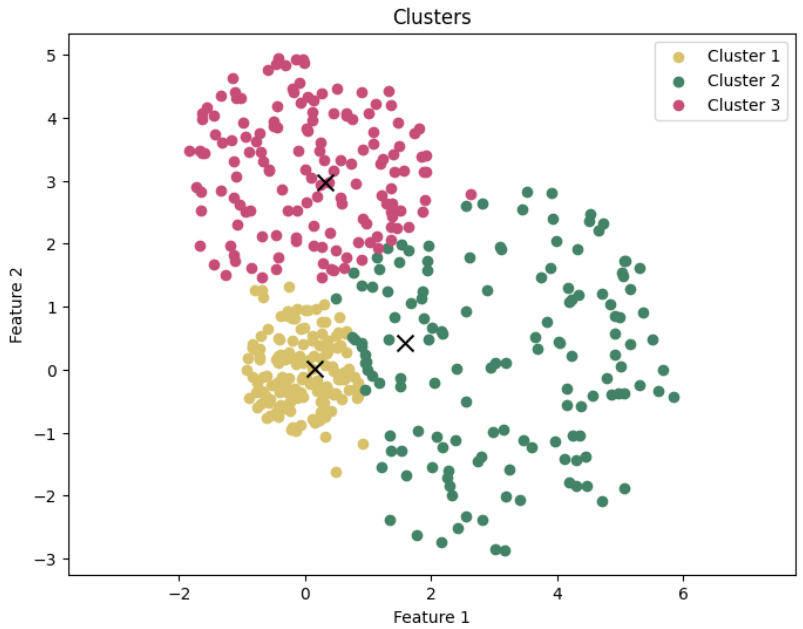
Finally, we visualize the clusters using a scatter plot. We generate random colors for each cluster and plot the data points along with the cluster centers.
# Plot the clusters
colors = generate_colors(num_clusters)
plt.figure(figsize=(8, 6))

for i in range(num_clusters):
   cluster_points = data[:, labels[:data.shape[1]] == i]
   plt.scatter(cluster_points[0], cluster_points[1], c=colors[i], label=f'Cluster {i+1}')

for i in range(num_clusters):
   plt.scatter(centers[0][i], centers[1][i], marker='x', c='black', s=100)

plt.xlabel('Feature 1')
plt.ylabel('Feature 2')
plt.title('Clusters')
plt.legend()
plt.axis('equal')
plt.show()
Further reading
Visit the Fuzzy Clustering Overview page for more information about this topic.
Need help?
If you encounter any issues or need further clarification, feel free to reach out via:
GitHub Issues for bug reports and feature requests.
Discord Community Server for discussions and troubleshooting.